
If your mobile internet feels slow, pages take time to load, or videos buffer, this guide will help you fix the problem quickly. These are simple steps anyone can follow.
1. Check Your Daily Data Limit
If your daily data is finished, your speed will automatically become slow.
How to check:
Open Settings → SIM & Network → Data Usage Check how much data you used today If the limit is over, the speed will stay slow until reset
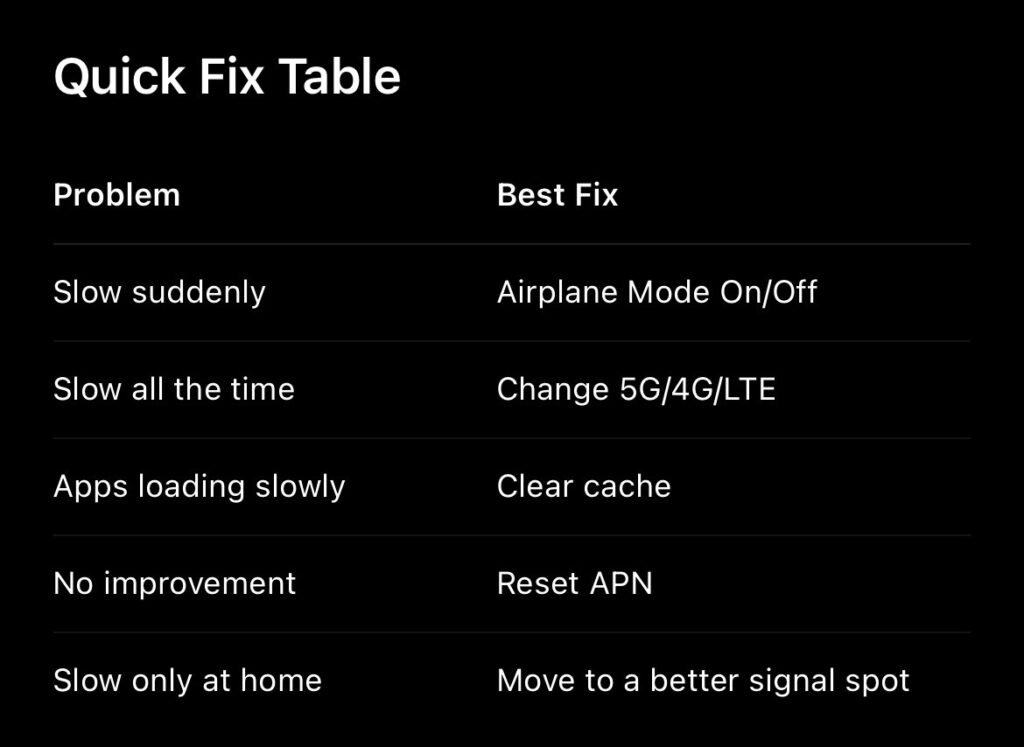
2. Turn Airplane Mode On and Off
This refreshes your mobile network.
Steps:
Open the notification panel Turn on Airplane Mode Wait 5 seconds Turn it off again
Your phone will reconnect to a nearby tower, which can increase speed.
3. Change Network Type (5G / 4G / LTE)
Sometimes 5G is crowded, and 4G works faster.
Try switching between these options to see what works best.
Steps:
Go to Settings → Mobile Network Change your preferred network type Try 5G to 4G or 4G to LTE Only
4. Clear App Cache
Apps store temporary files (cache) that slow down speed.
Clear cache of apps like:
Chrome Instagram WhatsApp YouTube
Steps:
Settings → Apps → Select App → Storage → Clear Cache
Do not click Clear Data.
5. Reset APN Settings
If your APN settings are wrong, your internet will become slow.
Resetting APN fixes this problem for many users.
Steps:
Open Settings → Mobile Network Tap on Access Point Names (APN) Select Reset to Default
6. Turn Off VPN
A VPN reduces internet speed.
If you use one, turn it off.
Steps:
Settings → VPN → Disconnect
7. Restart Your Phone
A simple restart fixes temporary network issues.
Restart your phone once every few days for stable performance.
8. Check for Network Issues in Your Area
Sometimes the problem is not your phone but the service provider.
You can check in the official apps:
MyJio Airtel Thanks Vi App
Or search online for:
“Jio outage today”
“Airtel outage today”
Why Mobile Internet Becomes Slow
Weak signal Too many apps running in the background Cache stored in apps Network congestion Old SIM card Temporary service provider issue.
Final Words
These steps solve slow mobile internet problems for most users.
Try them one by one, and your internet speed should improve quickly.
Know more: